
Built for the field
Your notes, photos and plans in one place.
Job sites, inspections, meetings: take a photo, draw on it, add a comment and find everything in one clear note, on your phone and then on your PC.
- No account
- No ads
- Your data stays with you
Three ways to use ePureNote
Start on your own with the phone, add the PC when you want to work at your desk, or equip your whole team with the server edition.
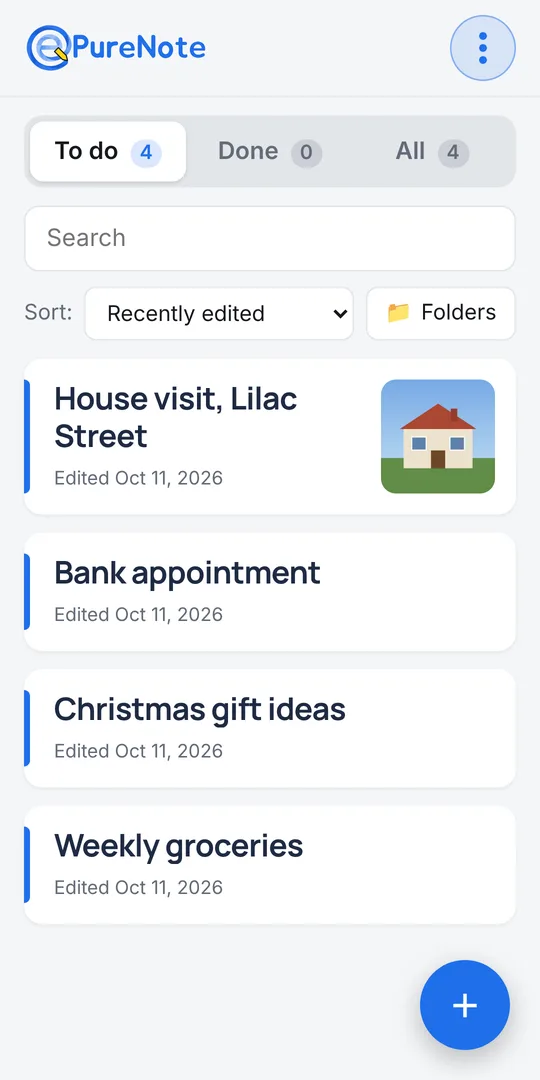
📱 Phone app
Your field notebook: notes, annotated photos, PDFs, formatted text. PDF and Word export with the subscription.
With subscription💻 PC app
Your notes on a big screen, synced with your phone whenever both are on the same network. No cloud.
Teams🏢 Server edition
Installed on your own server: one account per person, notes shared between colleagues, access from phone and PC.
Phone app · Android, then iPhone
A note is a complete page
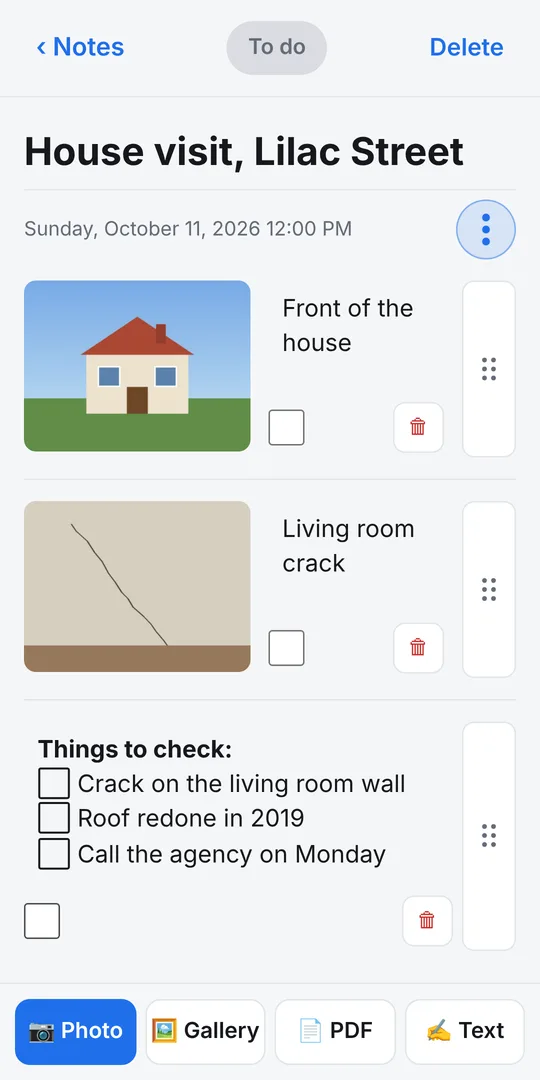
A title, then photos, text and PDFs in whatever order you like. Everything stays on your phone, even without a connection.
- Photos taken on site or picked from your gallery, each with its own comment
- Draw on photos: pen, highlighter and a ruler for straight lines; the original photo is always kept
- Formatted text (bold, colours, lists) and checkboxes
- PDFs attached to the note
- Photos sorted into groups (Bedroom, Living room, Kitchen…) you can fold and move
- To do and Done tabs: swipe a note to the right once it's done
- Search and sort by date or title
- Import notes sent by another ePureNote user
PDF export (4 photos per A4 page, comment alongside) and Word export are built into the app and unlock with the subscription. Everything else is free, with no limits.
PC app · Windows, macOS, Linux
The office picks up where the field left off
Review, complete and export your notes on a big screen. PC and phone exchange notes directly, without going through the Internet.
Local sync
When phone and PC are on the same network (office, home), notes and photos sync. Pairing is done once, by scanning a QR code.
Made for the big screen
A folder column to file your notes, keyboard and mouse, PDF and Word export in one click.
One subscription
The subscription bought in the phone app also unlocks the PC: the phone hands the licence over during sync. Nothing to type.
Direct download from this site. If the subscription ends, the PC app stays open in read-only mode: you always keep access to your notes.
Server edition · for teams
The whole team on the same notes
The server edition is installed on a server in your company. Each member has an account and finds their notes on their phone (installable app) and on their PC, in the browser.
- One account per person, created by the administrator
- Each note starts private, then is shared with chosen colleagues or the whole team
- Managers see every note, read-only
- Send a copy to a colleague, straight into their list
- To do / Done status kept per person
- Works offline, syncs as soon as the connection is back
- Nothing lost when a note is edited on two devices
- Personal folders on PC
- Remote access through a private VPN
- Nightly backup, with an encrypted copy off the server
Pricing
The phone app is free and complete. A single subscription unlocks exports and the PC app.
Phone app
Free
- Notes, photos, drawing, PDFs
- Groups, search, sort
- No account, no ads
- Unlimited notes
Subscription
€49 excl. VAT per year
- PDF and Word export on the phone
- PC app unlocked
- Phone ↔ PC sync
- One subscription for phone and PC
Bought in the phone app, through Google Play or the App Store. The price including tax is shown by the store.
Server edition
On quote
- Installed on your server
- Team accounts and sharing
- VPN access and backups
Download
ePureNote is coming to Android and PC first. Links will appear here as soon as it's released.
Frequently asked questions
Are my notes sent over the Internet?
No. With the phone and PC apps, your notes stay on your devices; sync goes directly over your local network. With the server edition, they stay on your company's server.
Do I need to create an account?
No, neither on the phone nor on the PC. Only the server edition uses accounts, managed by your administrator.
How is the PC app unlocked?
Subscribe in the phone app. At the first sync on the same network, the phone hands the licence over to the PC, which unlocks.
What happens if the subscription ends?
The phone app stays usable; only exports lock again. The PC app becomes read-only and sync stops. Your notes are never locked away.
Can I use ePureNote without a smartphone?
The apps are built around the phone, which carries the subscription. For a team that works mostly at the office, the server edition is the right fit.